Client advisory
Turn advisory conversations into action items and a recap the client actually reads, so the relationship keeps moving between monthly meetings.
Get started
You focus on the client, Ping takes the notes. It joins every client meeting, captures it, and turns it into prep, clean notes, action items, and a follow-up, ready before you leave the call. Made for accountants and bookkeeping firms.
The best note taker for accounting firms
Features
Ping builds a one-click agenda from last meeting's open items, recent emails, and the client's history, so you're prepared without digging through folders.
Ping listens in the background and transcribes in real time, and it actually understands accounting, so the terms, numbers, and deadlines come out right.


The moment the call ends, Ping has a summary, the action items, and a follow-up email in your voice, ready to review and send. Nothing to type up later.
Hi Christian, great catching up. Quick recap: we'll finalize the Q3 numbers by the 12th, and I'll send the revised statements Thursday for your review...
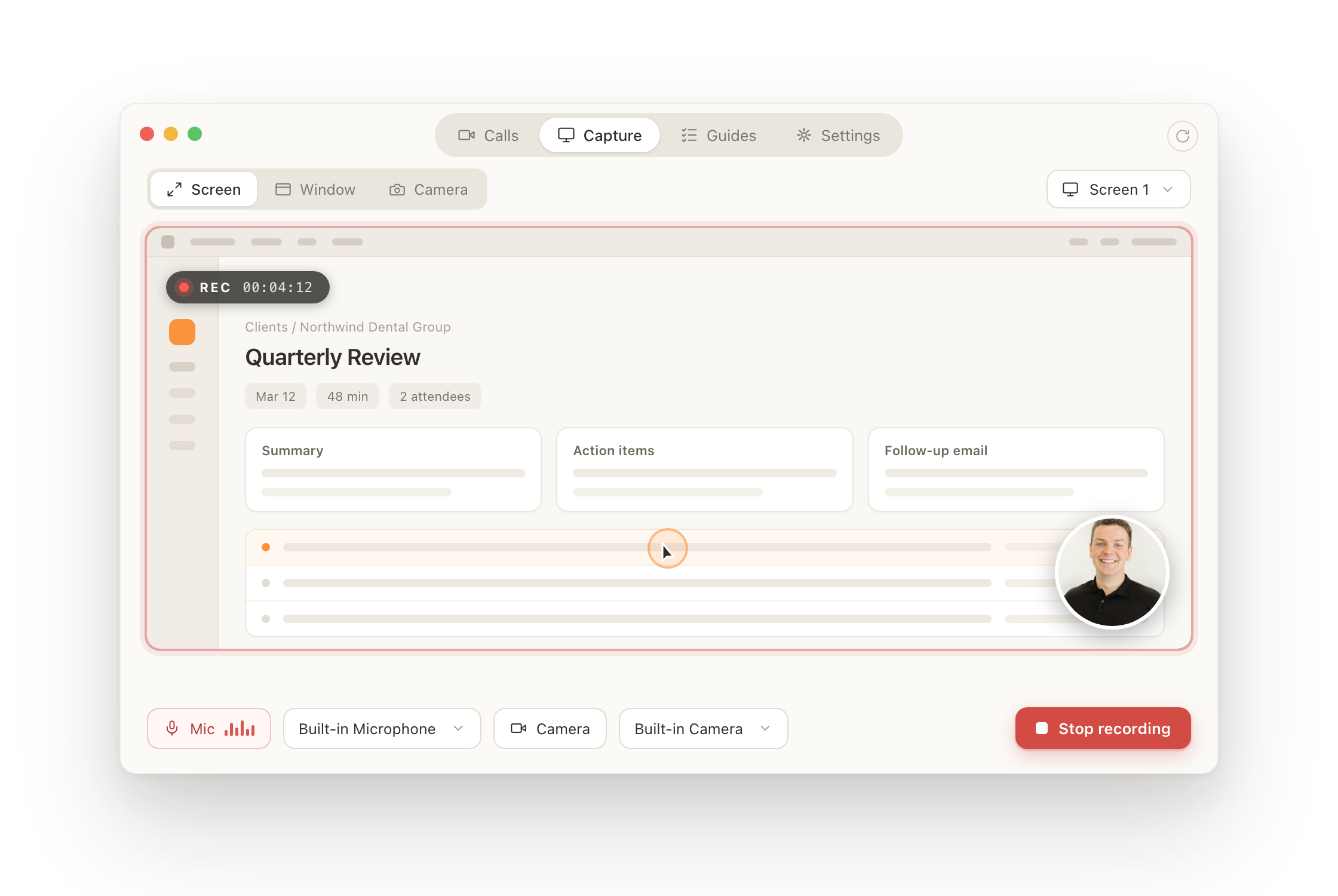
With the Ping desktop app, record in-person meetings and calls straight from your Mac or PC. No bot joining the call, no link to send. The recording still lands in your Ping library, written up and ready.
Features
Every past and upcoming meeting, captured, tagged, and searchable in one place, so any conversation is thirty seconds away instead of buried in someone's notes.
The complete recording with a timestamped transcript you can jump around, so you can revisit the exact moment anything was said.
See who did the talking and how the conversation felt, so you can coach the next meeting instead of guessing at this one.
Sort meetings by client, team, or topic, so the record stays tidy without anyone having to maintain it.
Choose how much detail you want, per meeting: a tight recap for the weekly check-in, the full write-up for quarterly reviews.
Reviewed Q3 numbers with Christian. Finalize by the 12th; revised statements Thursday. Two action items assigned.
Download any transcript in a click when you need it in a workpaper, an email, or anywhere else.
Send recaps internally or straight to clients, so everyone leaves the meeting with the same record of what was decided.
Hi all, here's the recap and action items from today's call. Full notes and the recording are linked below...
Clip the key moment and share just that, instead of sending someone an hour of recording to scrub through.
Put your firm's name and logo on the meeting bot, so clients see your brand in the room, not a third-party tool.
Ping runs an MCP server, so any AI client can pull full context from every meeting and answer with your real client record.

 MCP
MCP Every meeting becomes searchable knowledge. Ask Ping what a client said last quarter, what you promised, or to draft a proposal, and get an answer grounded in the real record.
Pulling the last three meetings, the scope you discussed, and your standard advisory package to put together a first draft...






Works where you meet
Always in context. Ping plugs into the meeting, email, and workflow tools your firm already runs on.
Built for the whole firm
Turn advisory conversations into action items and a recap the client actually reads, so the relationship keeps moving between monthly meetings.
Get startedWalk into every review with last year's notes and open items in hand, and leave with the follow-up already drafted, right through busy season.
Get startedEvery walkthrough and status call is captured with a clean record of what was asked, promised, and still outstanding, so nothing slips between fieldwork and review.
Get startedYour clients trust you with their most sensitive information. Ping protects every note, transcript, and account with verified third-party controls.
Independently audited controls for security, availability, and confidentiality by accredited CPA auditors.
Protected at every step with AES-256 encryption at rest and TLS 1.3 across all network traffic.
Your clients' information is yours alone. We never sell, retain, or use your data to train AI models.
Ping is built only for accounting firms, tuned to how you run client work. It connects every meeting to the full client relationship, so the notes stay useful long after the call.
Yes. Ping is an AI note taker made specifically for accountants and accounting firms. It records client calls, writes structured notes and action items, and drafts follow-ups in your voice, so accountants spend less time on admin and more with clients.
Yes. Ping works for bookkeeping firms and solo bookkeepers as well as CPA and accounting firms. It captures every client meeting and turns it into notes, action items, and follow-ups automatically.
Yes. Ping connects to your calendar and captures your client meetings automatically, then prepares you beforehand and writes up the notes afterward with no manual effort.
Notes, decisions, and tasks sync into the tools your firm already uses, so follow-through happens in your existing workflow instead of a separate app.
Ping works with Zoom, Microsoft Teams, and Google Meet, plus in-person client meetings.
Yes. You can record in-person meetings and Ping produces the same notes, action items, and follow-ups.
Yes. Ping drafts a recap and follow-up in your voice, ready to review and send.
Yes. Ping can join on your behalf and deliver the notes and action items as if you were there.
Yes. We auto-sync with most of the industry-leading practice management software. See our integrations.